What’s New in the Latest Version of SOLIDWORKS?

Table of contents
The latest release of SOLIDWORKS is packed with new capabilities and exciting enhancements and, at TECHNIA, we’re especially interested in those which are going to reduce clicks and boost workflow efficiency, those that will save time and reduce effort for you and your teams.
While it might steal a lot of headlines, it’s not just artificial intelligence that Dassault Systèmes has delivered in this release – for this list, we’re focusing on the CAD and collaboration tools at the heart of SOLIDWORKS Design.
So, we’ll leave the best of the AI-related enhancements for another list later in the year, instead turning our full attention to the top 5 best new features in SOLIDWORKS 2027!
5 – Point cloud data import
We’ll kick off this list with a completely new capability – the ability to import point cloud data into part files.
SOLIDWORKS Design 2027 removes inconvenient steps from scan data workflows by allowing the direct import of point cloud data into a part.
This factory layout is sizable at 5600 m2, but it loads quickly and handles well when navigating, as the E57 point cloud files are saved in a local repository on import for rapid access.
Note that there are no extra import options or refinement controls, but the imported point cloud data is housed within its own feature and can be shown, hidden, and used with section views.
Industry Insight
“SOLIDWORKS was never designed to be a mesh-modeller, but it’s always nice to see the developers accommodating more reverse engineering workflows.
The ScanTo3D add-in that comes included with SOLIDWORKS Professional and up has been able to handle basic mesh modelling and small point cloud data for a while now, but never large E57 files, which also include colours.
It sneaks onto this list as it is a new ability and should prove a helpful addition for those who frequently model SOLIDWORKS parts around large reference 3D scan data, especially in the ACE, Automotive, and Marine industries.”
Tom Watkins, SOLIDWORKS Technical Consultant | TECHNIA
4 – Improved Rotation Locking
SOLIDWORKS 2027 has improved rotation locks on component mates, giving more natural motion when rotating objects in an assembly.
More than two components can now be included within a single lock mate and it’s not just the concentric mate it applies to.
Coincident mates also gain the ability to lock rotation and it’s right there as a breadcrumb, so fasteners and components with axes can be fully defined in fewer clicks.
It’s a subtle but helpful enhancement and those who need it will be nodding along with us.
Industry Insight
“This seems like a subtle improvement at first, but it just feels so natural that it’s quite a significant upgrade for assemblies.
It’s exactly the sort of behaviour response you want when interacting with assemblies and should reduce the need to lock down all components before making micro-adjustments – it will really speed up fastener mating too.”
Michael Hopley-Ash, CSWE SOLIDWORKS Applications Engineer | TECHNIA
3 – Variability Tables
We can now define Variability Tables in SOLIDWORKS parts and assemblies to drive model dimensions, feature and component suppression states, and reference configurations from a single table.
Control how your models are displayed across entire assemblies and parts by defining inputs using variants, options, and numerical parameters. These can be easily switched between and automatically update the display without leaving the Feature Tree.
For many, this will feel like the familiar functionality of SOLIDWORKS configurations. But really, variability works like a more powerful version of global variables, driving model changes from the top-level assembly that cascade into child components and subassemblies automatically.
Industry Insight
“Variability has been a part of CATIA and 3DEXPERIENCE workflows for years, and now SOLIDWORKS gets its own integration!
This is an awesome enhancement lying in wait for the right workflows to connect with it and it’s not just a lightweight alternative to configurations.
Embedding variability into SOLIDWORKS opens the door to connecting CAD data to product variants and configured BOMs on the 3DEXPERIENCE platform using the Model Definition app included with the SOLIDWORKS PLM Premium role.
We recommend getting to grips with variability as soon as possible, while we also understand it has a development roadmap that stretches beyond SOLIDWORKS 2027 – so it’s one to keep an eye on.”
Michael Hopley-Ash, CSWE SOLIDWORKS Applications Engineer | TECHNIA
2 – Creation of Individual Parts for Wires and Cables
SOLIDWORKS Design 2027 introduces a subtle but powerful tick-box into route creation.
The Create Parts for Wires and Cables option appears on the Route property manager and lets us treat each wire, cable, and harness as individual parts in an assembly.
Previously, all wires and cables of a particular style were grouped together as features under a single part in the Route Parts folder. This caused complications for BOM and data management.
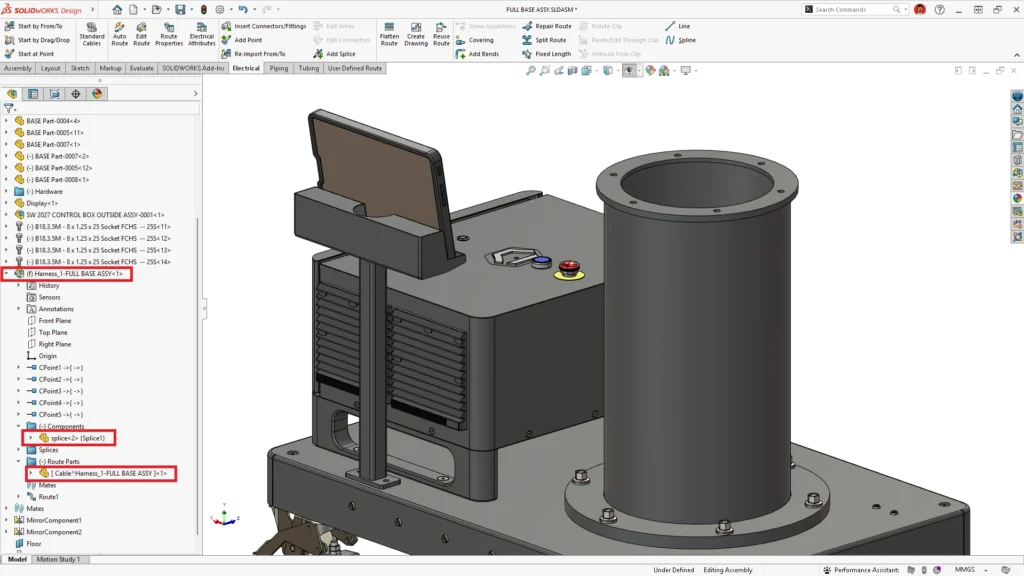
By treating each wire and cable as an individual part, we can locate, identify, and track specific wire components more easily while also improving documentation and visualization workflows in eDrawings, SOLIDWORKS Composer, and xHighlight.
Industry Insight
“This is huge news for Electrical Design teams as it means that users of the SOLIDWORKS Electrical 3D role on the 3DEXPERIENCE platform can compile complete wire lists and create unified BOMs on the platform to enhance data management, visualization, and analysis workflows.
Who knew a simple tick-box could hold such power?”
Tom Watkins, Senior SOLIDWORKS Technical Consultant | TECHNIA
1 – SOLIDWORKS as Platform Conversion Engine
At number one, we have the game-changing SOLIDWORKS Task Host.
This tool builds off existing software architecture to provide SOLIDWORKS users who have activated their Cloud Services the ability to generate PDF, DXF, DWG and STEP files on demand, on save, and even automatically when changing the maturity state of an object!
Simple to use and easy to set up, the Task Host runs on a dedicated machine to process a queue of jobs. Designers can request jobs from inside SOLIDWORKS for drawings, parts, and assemblies and any permitted collaborator can raise new jobs from the 3DEXPERIENCE platform.
The SOLIDWORKS Task Host is a must-have feature for cloud-connected workflows and when combined with maturity-driven stamping, we have a powerful tool that dramatically speeds up approval workflows and the export of files for use by external suppliers and manufacturers.
Industry Insight
“I simply love this tool and am having a ridiculous amount of fun testing it out.
It’s so satisfying to complete an approval and have SOLIDWORKS generate PDF, DXF, DWG or STEP files from the document without me having to do anything more than progress it’s maturity or request a derived output.
The output is honest and accurate, providing a great alternative option to the Derived Format Converter for SOLIDWORKS users.
While it technically snuck into 2026 FD04 as a beta, the full SOLIDWORKS 2027 release is going to play a key part in an exciting development plan. I can’t wait to see what else this tool will be able to do.”
Michael Hopley-Ash, CSWE SOLIDWORKS Applications Engineer | TECHNIA
So, what’s new in SOLIDWORKS Design 2027 xGA? Plenty.
While these are simply five of the best features of SOLIDWORKS 2027, the full list of enhancements can be found in the 3DEXPERIENCE platform.
Before you upgrade to SOLIDWORKS 2027, make sure to get in touch with our expert SOLIDWORKS consultants to see how the new features and the latest AI tools will fit into your workflows and benefit your business.
At TECHNIA, we’re able to support you whenever you choose to upgrade to the latest version of SOLIDWORKS, giving you a hassle-free upgrade experience so you can keep designing smarter products, faster.
Highlights from previous releases
SOLIDWORKS 2026
Focus: Faster design workflows with AI-assisted automation and improved performance.
- AI-powered drawing automation and fastener recognition
- Faster large assembly performance and smarter rebuilds
- Improved sheet metal, sketching, routing, and MBD tools
- Stronger ECAD–MCAD and 3DEXPERIENCE integration
SOLIDWORKS 2025
Focus: Refining core modeling tools and strengthening cross-disciplinary workflows.
- Smoother fillet and chamfer workflows and improved sheet metal detailing
- Faster assembly performance with better mate copying and mass property calculations
- Enhanced electrical and harness routing and improved ECAD–MCAD collaboration
- Upgraded rendering and more robust import and export tools
SOLIDWORKS 2024
Focus: Streamlining workflows and improving tool performance.
- Expanded cloud services for design sharing and collaboration
- Silhouette defeature for IP secure model simplification
- Updated mate references for more predictable component placement
SOLIDWORKS 2023
Focus: Better connectivity and improved usability.
- Stronger 3DEXPERIENCE integration for improved collaboration and data management
- Faster opening, saving, and handling of large assemblies
- Improved electrical routing tools for advanced configuration and documentation



Want to receive more content like this?
Our monthly thought leadership newsletter delivers detailed digital engineering knowledge directly to your inbox. Our experts provide their insights on the latest trends and innovations across disciplines such as:
- Advanced simulation
- Digital engineering
- Product lifecycle management
- Virtual twin


